Nano Banana Battle Maps: What Gemini Can and Cannot Do
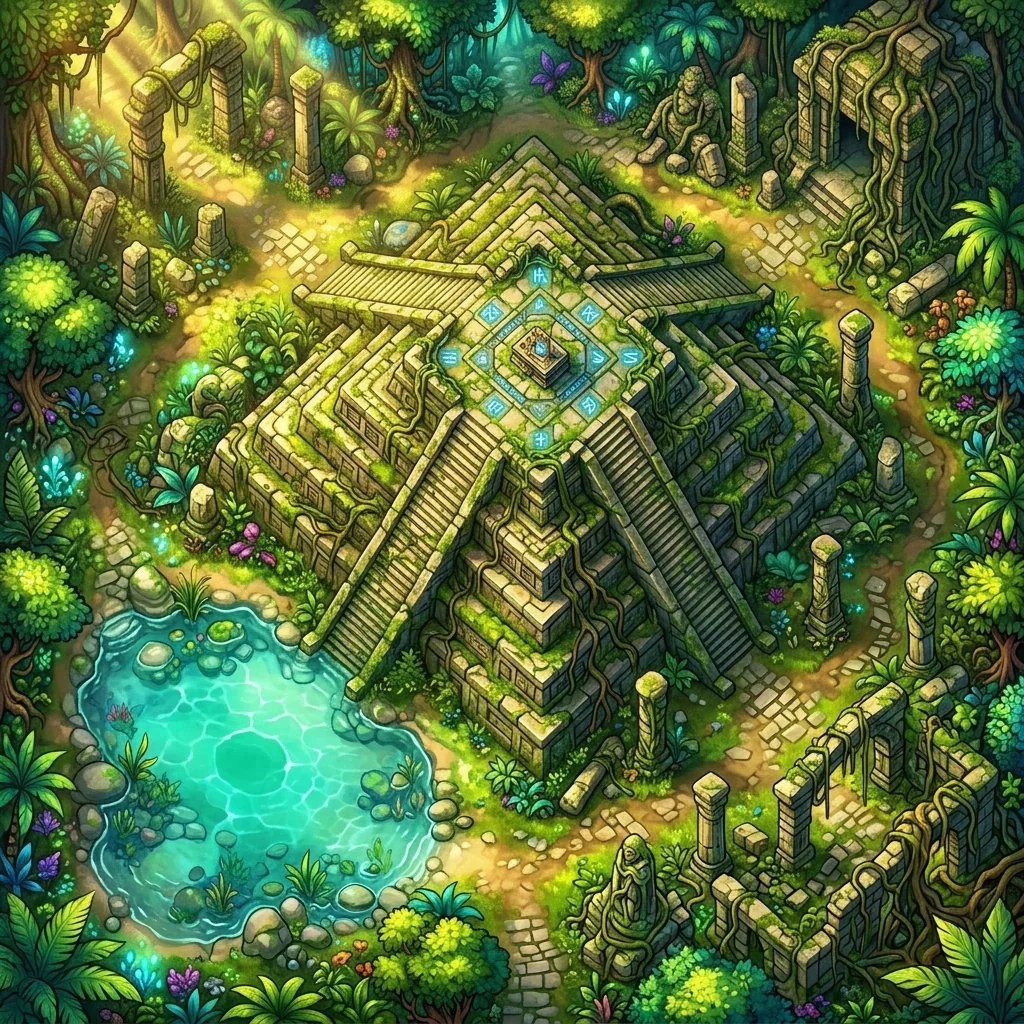
Prompting Nano Banana for battle maps has become something of a hobbyist sport. Google's playfully named Gemini image models produce some of the most gorgeous fantasy art you can get from a chat window, and Game Masters have understandably started asking the obvious question: can I just describe Friday night's jungle temple to Gemini and drop the result onto my virtual tabletop? The honest answer is sometimes, with caveats that matter a great deal once miniatures and grids get involved.
In this review, we will give raw Gemini its full due, walk through the five battle-map-specific gaps we keep running into, share three prompt tips that meaningfully improve the output, and explain when a dedicated map generator is the better path to a table-ready map. If you are brand new to the idea of typing a description and getting a map back, our explainer on what text-to-map AI is covers the fundamentals first.
What raw Gemini gets right
Credit where it is due: the scenes are beautiful. Ask Nano Banana for a moss-covered ziggurat in luminous jungle foliage and you will get painterly light, convincing stone weathering, and a mood that would not look out of place on a module cover. The prop detail is a particular strength. Workbenches get scattered tools, shrines get melted candle wax, and docks get coiled rope, all without you asking. For establishing shots, player handouts, and location art, raw Gemini is genuinely excellent.
The iteration experience is also pleasant in a way that older image tools never were. Because you are working in a conversation, you can say "make the swamp gloomier" or "add a collapsed bridge on the east side" and the model follows along. That conversational loop makes experimenting fun, and it is a big part of why so many hobbyists are generating maps this way in the first place.
Five gaps between a pretty picture and a playable map
The camera drifts off top-down
Battle maps need a true 90-degree overhead view so tokens sit flat and distances read honestly. Ask Gemini for "top-down" and you will often get a handsome three-quarter angle instead: walls lean outward, the far side of the map foreshortens, and buildings show their facades. It looks cinematic and plays terribly, because a token standing "next to" a wall is actually floating over its roof.
Pre-baked grids warp
Because most battle maps in the wild have grids, the model helpfully draws one, and that is the problem. Generated grid lines bend around objects, squares change size across the image, and none of it aligns with the grid your VTT overlays. A warped baked-in grid is worse than no grid at all, since you cannot remove it without editing the image.
Scale wanders across the scene
In a single generation, a doorway on the left may read as five feet wide while a barrel on the right is the size of a cart. Humans notice scale errors on maps instantly, because the grid invites measuring. Raw image models optimize for a good-looking composition, not for a consistent number of feet per inch.
One fix changes everything
Ask for the campfire to be removed and you will usually get a new image where the trees have shuffled, the textures have shifted, and the clearing is a different shape. Conversational edits are approximate rerolls, not surgical changes, which stings when the rest of the map was already perfect.
Style drifts across a campaign
Ten dungeon rooms generated across ten chats come back in ten subtly different styles: different palettes, different line weights, different lighting logic. A campaign's maps should feel like one world, and keeping raw Gemini on-style for months takes real prompt discipline.
Three prompt tips that actually help
First, say "top-down orthographic view" rather than just "top-down." The word orthographic pushes the model toward a flat architectural plan and away from the cinematic three-quarter angle. Second, explicitly ask for a gridless map and let your VTT draw the grid; this sidesteps the warped-grid problem entirely and aligns better at the table. Third, specify a lighting direction, such as "soft light from the northwest," so shadows fall consistently and the scene reads as one coherent plane instead of a collage.
Put together, a solid raw-Gemini prompt looks like this: "Top-down orthographic view of a jungle temple clearing, moss-covered stone ziggurat, luminous foliage, rope bridge over a stream, soft light from the northwest, no grid, gridless digital art." For a deeper structure that works across every AI tool, our guide to the perfect AI map prompt breaks the formula down piece by piece.
Where dedicated map tools fit
Here is the framing that we think is fairest. Modern dedicated map generators, Text to Tabletop included, build on image models of exactly this class, and then add the map-specific tooling on top that a general chat interface does not have. That means an enforced 90-degree top-down perspective on every generation, grid-free output by default, area regeneration so you can fix one corner of a map without rerolling the rest, resolution tiers from 1K up to a printable 4K, and a .dd2vtt export that carries grid alignment into Foundry and other VTTs.
In other words, every gap in the list above is a solved problem one layer up the stack. Raw Gemini is a wonderful sketchbook: fast, conversational, and inspiring. A dedicated AI battle map generator is the table-ready path, because it spends its effort on the exact constraints that make a picture playable. We ran this same experiment with another general-purpose chatbot, and the results rhyme almost beat for beat; see our companion piece on whether ChatGPT can make battle maps for that side of the story.
Great sketchbook, tricky map table
So what should a Game Master actually do with Nano Banana? Use it for what it is brilliant at. Concept your locations, generate player handouts, explore styles, and enjoy the conversational brainstorming; there is no cheaper way to find out what your sunken temple wants to look like. Then, when a scene needs to hold tokens, distances, and a grid overlay for three hours of combat, generate the final version with a tool built for the tabletop. The same trade-off shows up with every general model, and our Stable Diffusion battle map prompts guide walks through how far you can push one with negative prompts and ControlNet.
The gap between a gorgeous image and a playable map is real, but it is also narrower than it has ever been, and you are on the right side of history for asking. When you are ready to turn tonight's idea into a map your players can actually fight across, sign up for the Text to Tabletop app today and start generating custom maps in seconds.
Tyler V
Lead Developer and UX Designer at Text to Tabletop. Passionate about helping GMs and players create better TTRPG experiences.
Ready to Forge Your Next Battle Map?
Describe the encounter and get a grid-aligned, top-down battle map in seconds, then regenerate any area until it matches your vision.
Generate Your First Map Free3 free map tokens · no credit card required