Can ChatGPT Make 5e Battle Maps? An Honest Test
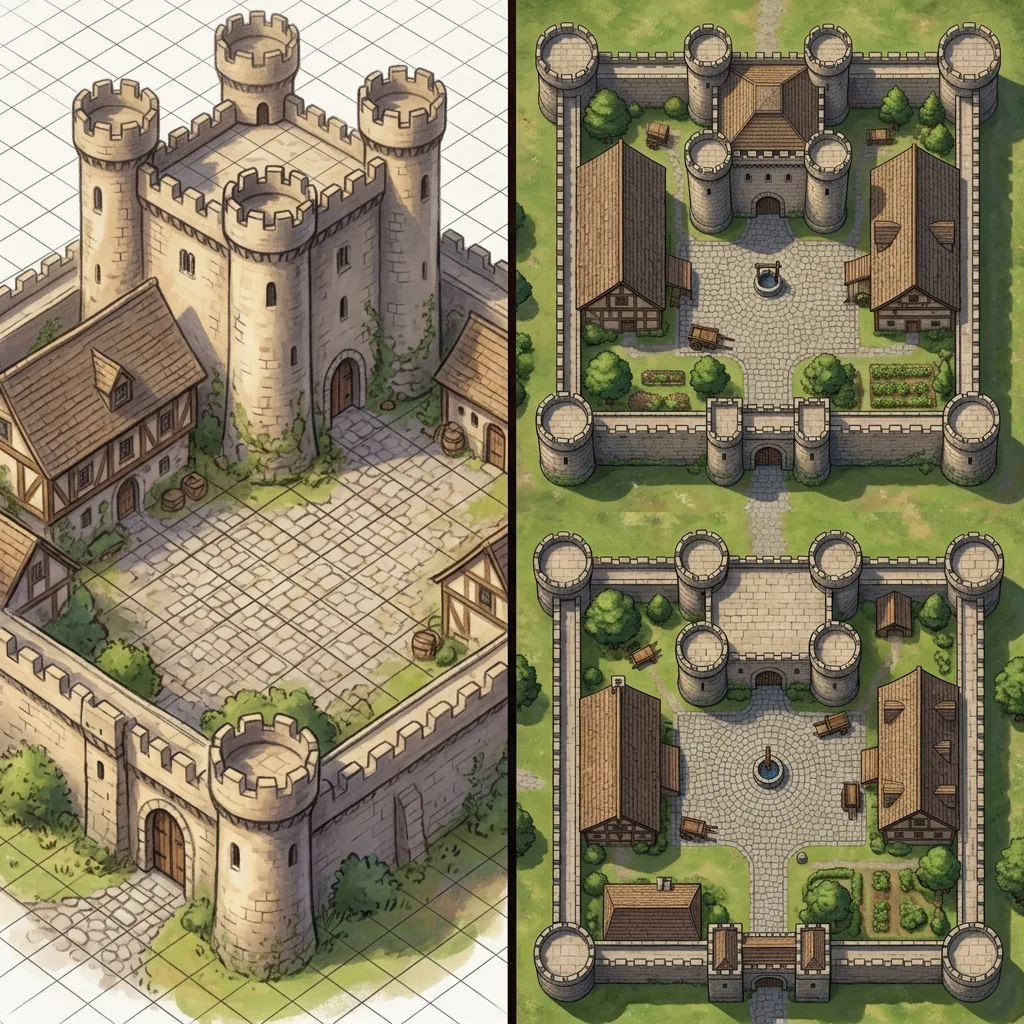
Can ChatGPT make battle maps? If you already use it to draft NPC dialogue, summarize session notes, or brainstorm plot hooks, it is a completely natural question. The image generation built into ChatGPT is genuinely impressive, it is right there in a tool you already have open, and asking it for "a top-down map of a ruined courtyard" takes about ten seconds. Plenty of Game Masters have tried exactly that, and the results are interesting: sometimes charming, sometimes chaotic, and almost never quite right for the table.
In this honest test, we will give ChatGPT full credit for what it genuinely does well, then walk through the specific ways its battle maps break down once you try to actually play on them. We will finish with a fair verdict: the situations where ChatGPT is truly enough, and the situations where a dedicated battle map generator earns its place in your prep toolkit. If you are new to the whole category of typing descriptions and getting maps back, our beginner's guide to text-to-map AI covers the fundamentals.
What ChatGPT genuinely does well
Let us start with the honest praise, because there is plenty to praise. ChatGPT is fast and frictionless. There is no new account to create and no new interface to learn. You describe a scene in plain language, and an image appears in the same chat window where you were just writing your villain's monologue.
The conversational iteration is the standout feature. You can say "make it darker," "add a fountain in the middle," or "now show it after the fire," and the model understands you. For brainstorming, that back-and-forth is genuinely useful. Describing a location out loud, even to a machine, forces you to decide what actually matters about it.
The images themselves can be lovely. As scene illustrations, they have real atmosphere: moody lighting, painterly texture, a strong sense of place. If you run theater-of-the-mind combat and just want a picture to hold up and say "you are here," a ChatGPT image is often a perfectly good first pass. The same goes for player handouts, establishing shots of a city skyline, or a quick visual to anchor a description you are improvising mid-session.
Where the battle maps break down
A battle map is not just a picture. It is a measuring tool, a movement surface, and a shared tactical reference. That functional job is exactly where a general-purpose image model starts to struggle, and the problems are consistent enough that you can reproduce them yourself in a few minutes of testing.
The grid drifts and warps
Ask ChatGPT for a battle map and it will usually bake a grid directly into the image, because most battle maps in its training data have one. The problem is that the grid is drawn, not calculated. Squares subtly change size across the image, lines bow and wander, and what should be a square is often a slightly drunk parallelogram. The moment you import that image into Roll20 or Foundry and lay the VTT's own grid on top, the two grids disagree, and tokens end up straddling walls. You cannot cleanly align a grid that was never straight to begin with.
Scale wanders from object to object
Look closely at a ChatGPT map and the proportions start to slide. A door might be as wide as the corridor it opens into, a bed might dwarf the room around it, and a table in one corner might seat giants while the identical table across the hall seats halflings. None of this matters in an illustration, but on a battle map, scale is the whole point. When a five-foot square cannot be trusted to hold five feet, movement, reach, and area spells all become arguments.
The camera refuses to stay overhead
Battle maps need a strict 90-degree top-down view so that distances are true in every direction. General image models are trained mostly on art with perspective, so they constantly pull the camera toward a tilted, three-quarter angle. Walls gain visible faces, the far side of the map compresses, and furniture is rendered from the side. It looks dramatic, and it is useless for measuring a charge.
You cannot fix just one corner
This is the failure that costs the most prep time. Suppose ChatGPT gives you a courtyard you mostly love, except the well is in the wrong place. Your only real option is to regenerate the entire image, and the new version changes everything: the layout, the lighting, the details you liked. There is no way to hold the map still and revise one area. Dedicated tools solve this with area regeneration, where you select just the offending region and reroll it while the rest of the map stays untouched.
Resolution and readable detail
Finally, there are the practical limits. ChatGPT outputs are fine on a phone screen, but stretch one across a 4K television or print it at one inch per square and the fine detail turns to mush. And if the model decides to label anything, brace yourself: signs, tombstones, and shop fronts come out in the familiar melted almost-language of AI text, which players will absolutely zoom in on and mock.
When ChatGPT is genuinely enough
None of those failures matter if you never put tokens on the image. If your table runs theater of the mind, a ChatGPT scene illustration is quick, evocative, and free with the subscription you may already have. It is also a great concepting tool: generate five loose takes on "abandoned dwarven forge," pick the vibe you like, and then build the real map elsewhere. If you are wondering where any of this sits with publishers and map communities, our piece on whether AI art is acceptable for tabletop maps covers the rules that actually apply. For handouts, portraits of places, and inspiration, ChatGPT is honestly good, and pretending otherwise would be unfair.
It is worth saying clearly: if that covers your needs, you do not need anything else, and you can stop reading here with our blessing.
When a dedicated generator earns its keep
The calculation changes the moment combat happens on the image. A dedicated tool like Text to Tabletop is built around the exact failures listed above: it enforces a locked top-down perspective, strips out pre-baked grids and character tokens so your VTT's own grid aligns cleanly, and offers area regeneration so you can fix the one wrong corner without losing the map. Resolution tiers up to 4K keep detail crisp for large screens and print, and the .dd2vtt export carries grid alignment straight into Foundry. You can see the full feature set on the AI battle map generator page.
Helpfully, nothing you learned in ChatGPT is wasted. Describing scenes in specific, concrete language is the core skill of every text-to-image tool, and our guide to writing the perfect AI map prompt shows how to sharpen those descriptions for tactical output. And if you are weighing dedicated generators against each other rather than against ChatGPT, our Text to Tabletop versus FantasyGen comparison breaks down how two purpose-built tools differ. If you would rather run the model yourself, our Stable Diffusion battle map prompts cover the settings that matter more than the wording.
So, can ChatGPT make battle maps?
Here is the fair verdict. ChatGPT can make images of battle maps, and sometimes very pretty ones. What it cannot reliably make is a battle map you can play on: the grid drifts, the scale wanders, the camera tilts, and there is no way to revise one area without rerolling the whole scene. Use it for what it is great at, which is fast, conversational scene illustration and brainstorming. When the fight actually starts and every square has to mean five feet, reach for a tool built for the job. Sign up for the Text to Tabletop app today and start generating clean, table-ready battle maps in seconds.
Tyler V
Lead Developer and UX Designer at Text to Tabletop. Passionate about helping GMs and players create better TTRPG experiences.
Ready to Forge Your Next Battle Map?
Describe the encounter and get a grid-aligned, top-down battle map in seconds, then regenerate any area until it matches your vision.
Generate Your First Map Free3 free map tokens · no credit card required