AI 5e Map Maker: Generate Battle Maps from a Text Description
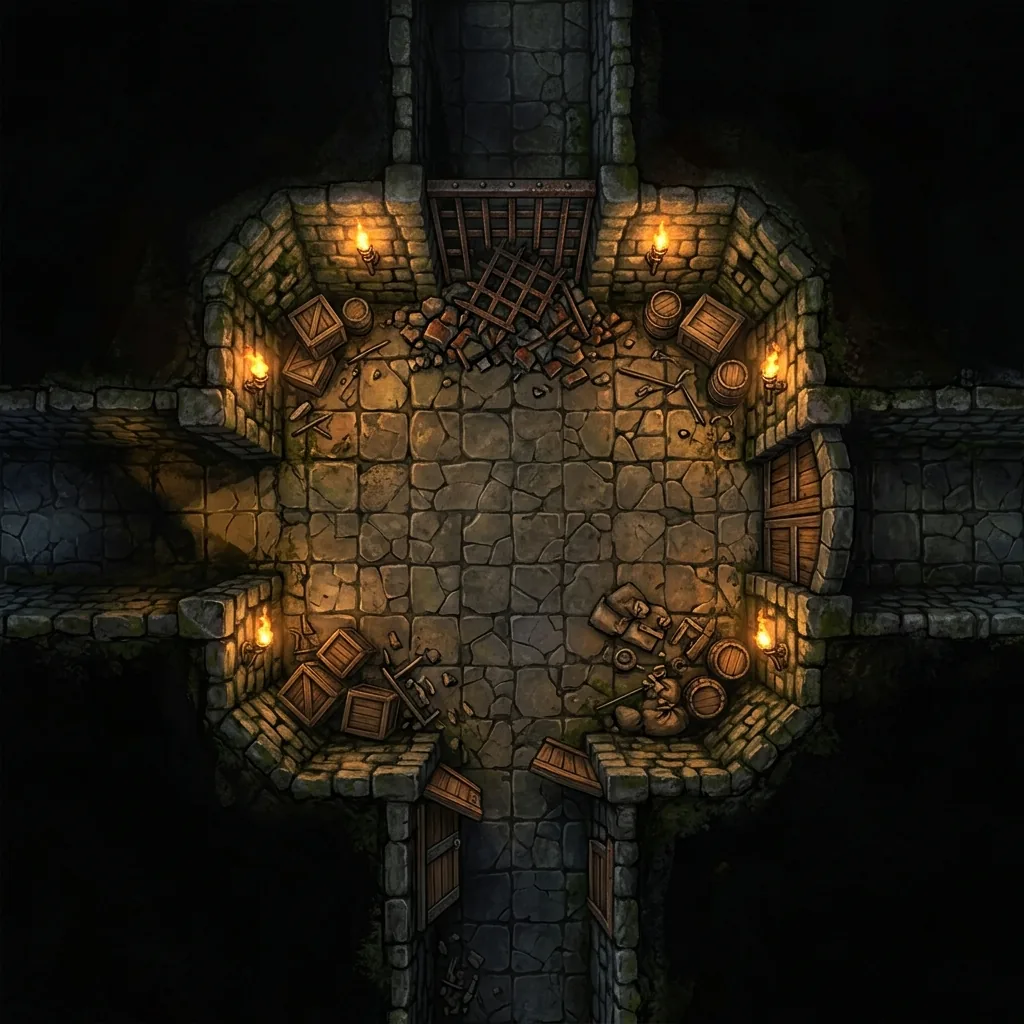
If you are searching for an AI D&D map maker, you have probably hit the same wall every Game Master eventually hits. The encounter in your notes is specific: a collapsed shrine crawling with kobolds, a smuggler tavern with a trapdoor behind the bar, a crypt where the party finally corners the necromancer. The maps in your folder are generic. You can spend an hour digging through asset packs for a close-enough match, spend an evening drawing the scene by hand, or run the fight in a featureless white room and watch the tactical tension drain out of it.
There is now a better option. A modern 5e map maker powered by generative AI turns a plain text description into a playable battle map in seconds. In this guide, we will cover why 5e maps have requirements that generic art tools ignore, how text-to-map generation actually works, four copy-paste prompts for the classic fantasy environments, how to move the results into your virtual tabletop, and what separates a genuinely useful map maker from an ordinary image generator.
Why 5e battle maps have specific needs
The 5e rules run combat on a grid of 5-foot squares, and that single rule shapes everything a good map has to do. A character with a 30-foot speed moves six squares. A fireball covers a 20-foot radius, which lands on the table as a circle four squares out from its center. When your players study a map, they are not admiring artwork. They are counting squares, measuring spell templates, and deciding whether the rogue can reach the enemy archer before the end of the turn.
That means a 5e battle map needs three things that generic fantasy art rarely delivers. The first is tactical spacing: rooms and clearings sized so a party of four or five adventurers can actually maneuver, rather than passages that would be shoulder-width at scale. The second is readable chokepoints: a doorway should obviously be one square wide and a bridge obviously two, so nobody argues mid-fight about whether the fighter can hold it alone. The third is clear terrain logic: cover that visibly blocks line of sight, hazards that are unmistakably hazards, and elevation changes a player can parse at a glance. A map that fails these tests turns combat into a static slugfest, no matter how pretty it looks.
How an AI 5e map maker works
Text-to-map generation is exactly what it sounds like. You type a description of the scene, and a generative model built for overhead terrain renders the entire environment: floor textures, walls, furniture, foliage, and lighting, composed as one coherent image. There is no asset library to browse and no tiles to line up. A dedicated AI map generator for tabletop RPGs goes further than a general-purpose art model by enforcing map-specific constraints, such as locking the camera to a strict 90-degree top-down view and stripping out baked-in grids and character tokens, so the image sits cleanly under the grid your virtual tabletop draws for itself.
The craft on your side is the prompt. A strong prompt names the location, the key tactical features, and the mood. "A ruined watchtower, rubble for cover, a narrow cliff path, dense autumn pines" gives the generator far more to work with than "a cool tower." If you want the complete workflow from blank page to finished file, our step-by-step guide on how to make AI battle maps walks through it, and our breakdown of the perfect AI map prompt covers the wording formula in depth.
Four classic 5e environments to prompt
The fastest way to learn prompting is to borrow prompts that already work. Here are ready-to-use examples for the four scenes almost every campaign visits, written in the comma-separated style that generators parse best.
The dungeon chamber
The bread and butter of the dungeon crawl. Ask for branching corridors so the party has to make a choice, and pillars or rubble so the fight has cover.
"Top-down dungeon battle map of a torchlit stone chamber, cracked flagstone floor, three branching corridors, thick stone pillars, scattered rubble piles for cover, iron sconces with orange torchlight, deep shadows at the edges, gridless digital art."
The tavern
Half of all campaigns begin in a tavern, and a fair number of sessions end in a bar fight. The furniture is the terrain: tables, benches, and the bar itself become cover and obstacles.
"Top-down tavern interior battle map, long wooden bar with stools, round tables and benches, stone hearth with a burning fire, staircase to an upper landing, cellar trapdoor behind the bar, warm candlelight, gridless digital art."
The forest road ambush
The classic travel encounter. An overturned cart gives the ambushers a reason to be there and gives the players something to fight around.
"Top-down forest road battle map, muddy wagon trail curving through dense pine trees, overturned merchant cart with scattered crates, shallow ditch along the roadside, moss-covered boulders for cover, overcast daylight, gridless digital art."
The crypt
Rows of sarcophagi create natural lanes and cover, and a collapsed wall is a ready-made hook for a hidden chamber.
"Top-down crypt battle map, narrow entry staircase, rows of stone sarcophagi, burial niches along the walls, collapsed wall opening into a hidden chamber, braziers with pale green flame, cold stone shadows, gridless digital art."
Getting AI-generated 5e maps into your VTT
AI-generated battle maps arrive as ordinary image files, so they upload to Roll20, Foundry, Owlbear Rodeo, or any other virtual tabletop the same way a purchased map would. The workflow is simple: download the map, upload it to the platform's map or background layer, and align the software's grid to the image. Because a good generator outputs clean, gridless terrain, alignment means scaling the image to the page rather than fighting a pre-drawn grid that never quite matches the digital one.
Some tools shorten the process further. Text to Tabletop exports a .dd2vtt Universal VTT file alongside the PNG, and that file carries grid alignment data directly into Foundry and other Universal VTT-aware platforms, so the map lands pre-scaled. For platform-by-platform instructions, see our guide on how to use AI maps in your VTT.
What to look for in a 5e map maker
Not every image generator makes a good 5e map maker. Before you commit your prep routine to a tool, check for four capabilities.
The first is top-down enforcement. Generic art models drift toward cinematic angles, and a map with skewed perspective ruins range and movement measurement. You want a hard 90-degree overhead lock built into the engine, not a perspective keyword you have to hope the model respects.
The second is area regeneration. Your first result is rarely perfect, and regenerating the whole map to fix one bad corner wastes time and throws away the parts you liked. The standout tools let you select a region of a finished map and regenerate only that area, keeping the rest intact.
The third is resolution tiers. A quick side-encounter map does not need the same fidelity as the poster-sized finale of your campaign arc. Look for a range from fast 1K generations up to 4K output for the scenes players will zoom into.
The fourth is VTT export. Beyond a plain image, a .dd2vtt file saves you the grid alignment step entirely on supported platforms. Our AI battle map generator was built around exactly these four requirements, from the automatic top-down lock to area regeneration and Universal VTT export.
Your next session deserves better than a recycled forest clearing. Describe the scene the way you would describe it to your players, generate it, and spend the hours you saved on the story itself. Sign up for the Text to Tabletop app today and start generating custom 5e battle maps in seconds.
Tyler V
Lead Developer and UX Designer at Text to Tabletop. Passionate about helping GMs and players create better TTRPG experiences.
Ready to Forge Your Next Battle Map?
Describe the encounter and get a grid-aligned, top-down battle map in seconds — then regenerate any area until it matches your vision.
Generate Your First Map Free3 free map tokens · no credit card required