Gridded vs Gridless Battle Maps: Which One Should You Use?
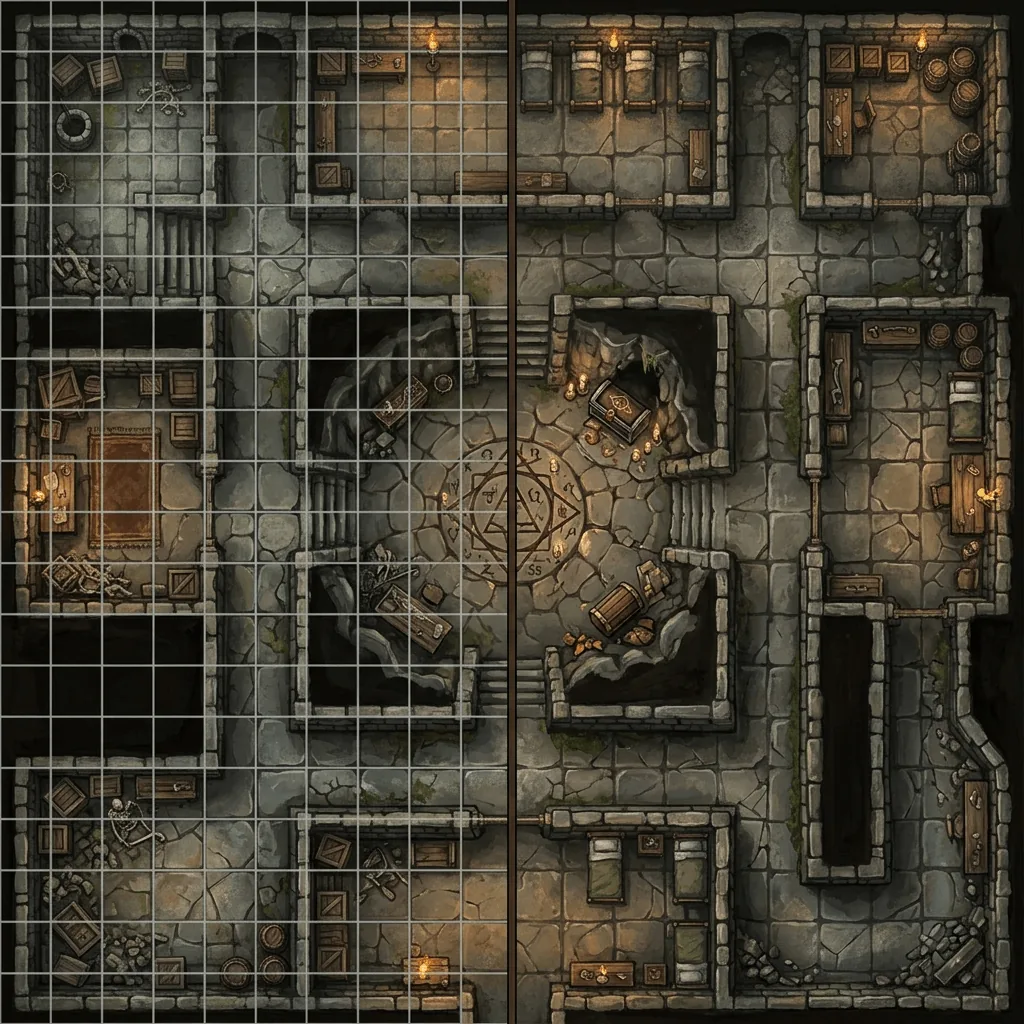
Every battle map you download, buy, or generate arrives as one of two things: an image with grid lines drawn into the art, or an image without them. Map studios often ship both versions in the same pack, which tells you something important. Neither one is correct in general. They are correct in different situations, and the situations are easy to name.
This guide sorts out which version you want, why the wrong choice creates the single most common battle map headache in virtual tabletop play, and how to end up with both without doing any extra work.
Should a battle map have a grid?
Use a gridless battle map for virtual tabletop play, because the software draws its own grid and a second set of lines in the image will never line up perfectly with it. Use a gridded battle map for printing and for physical play, because paper cannot draw a grid for you and miniature bases need one. If you can only keep one file, keep the gridless version: adding a grid later is easy, and removing a painted-on grid is not.
The comparison at a glance
| Gridded map | Gridless map | |
|---|---|---|
| VTT play | Risk of double grid misalignment | Aligns cleanly, VTT draws the grid |
| Printing | Ready to print and play on | Needs a grid added first |
| Immersion | Lines sit on top of the art | Looks like an illustration |
| Measuring distance | Visible on the image itself | Handled by the VTT or a ruler |
| Scaling and cropping | Cropping breaks the grid alignment | Crops freely |
| Converting to the other | Hard, the lines are part of the art | Easy, one overlay step |
The double grid problem
This is the reason experienced virtual tabletop users ask for gridless maps by name.
Roll20, Foundry, and Owlbear Rodeo all draw a grid as a software layer over whatever image you upload. That layer is what the software measures with, what tokens snap to, and what your dynamic lighting respects. When your image already contains painted grid lines, you now have two grids on screen, and getting them to agree means scaling the image until the painted squares match the software squares to within a pixel or two.
Sometimes that works on the first try. More often the map was drawn at 72 pixels per square, your page is set to 70, and by the far corner of a thirty square map the two grids are visibly a full square out of step. Players start asking which lines to count, and the answer is always the invisible ones. Half an hour of prep disappears into dragging a corner handle.
A gridless map has no opinion about scale, so there is nothing to reconcile. You set the grid size on the page, stretch the image to fit, and every square the software draws is the square everyone counts. Our guide to using AI maps in a VTT walks through that import for the three major platforms.
When a grid in the image is the right call
Printing is the clear case. A printed battle map has no software layer, so the grid has to be in the ink. Print it at one inch per square so miniature bases sit correctly, and check the alignment before you commit to a large format print, because a grid that drifts across three taped pages is worse than no grid at all. Our print to scale guide covers the math and the tiling.
There are two smaller cases worth knowing. If you display maps on a television laid flat under physical miniatures, the screen is functioning as paper, so the grid needs to be in the image unless your display software can draw one. And if you share maps as flat images in a chat app during a play by post game, a grid gives your players something to reference without any tooling at all.
When gridless wins beyond the VTT
Immersion is the argument map artists make, and it is a real one. Grid lines are a game aid sitting on top of an illustration, and once you have seen the same scene both ways, the clean version looks like a painting while the gridded version looks like a component. For a map you reveal as a dramatic set piece, a handout, or a printed poster on the wall, gridless is simply better looking.
Gridless also survives editing. Crop a gridded map and the grid no longer starts at the edge. Rotate it and the lines run diagonally. Scale it non uniformly and the squares become rectangles. A gridless image takes all of that without complaint, which matters if you reuse locations across a campaign, chop a large map into two encounters, or regenerate one section of a map for a later scene.
Hexes are a third answer
If your system measures in hexes rather than squares, the same logic applies with one extra wrinkle: hex orientation. A map with painted hexes has picked flat top or pointy top for you, and your virtual tabletop may default to the other. That is one more reason to keep the art gridless and let the software decide. Our full comparison of hex grid vs square grid battle maps covers which one your system and your terrain actually want.
How to get both versions
The practical workflow is to treat the gridless image as your master file and generate the gridded version on demand.
- Keep or generate the map with no grid drawn into the art.
- For virtual tabletop play, upload the gridless file and set the grid on the page.
- For print, add a grid overlay at one inch per square, then print.
- Store only the gridless master, because you can always rebuild the other one.
Adding the overlay takes a couple of minutes in any image editor, and several browser tools do it in one step. Our guide on how to add a grid to a battle map has the steps for each tool, including the reverse operation for maps that came with a grid you do not want.
Generating gridless by default
This is one of the places where generated maps have a structural advantage over both packs and hand drawn art. General purpose image models love to paint grid lines, because most of the battle map art they learned from has them, and the lines they paint are rarely square and almost never evenly spaced. A warped grid is worse than a wrong one, because you cannot even scale it into agreement.
Text to Tabletop strips baked in grids as part of generation, so what comes back is a clean top down image that your VTT can measure honestly. That also makes the area regeneration workflow practical: you can select one part of a finished map, change it, and drop the result back in without a grid seam showing across the patch. If you would rather skip the retrofitting entirely, sign up for the Text to Tabletop app, use your 3 free tokens, and generate a gridless master you can grid however each session needs.
Tyler V
Lead Developer and UX Designer at Text to Tabletop. Passionate about helping GMs and players create better TTRPG experiences.
Ready to Forge Your Next Battle Map?
Describe the encounter and get a grid-aligned, top-down battle map in seconds, then regenerate any area until it matches your vision.
Generate Your First Map Free3 free map tokens · no credit card required