AI Battle Map Generator: How to Create Tactical Encounters Instantly
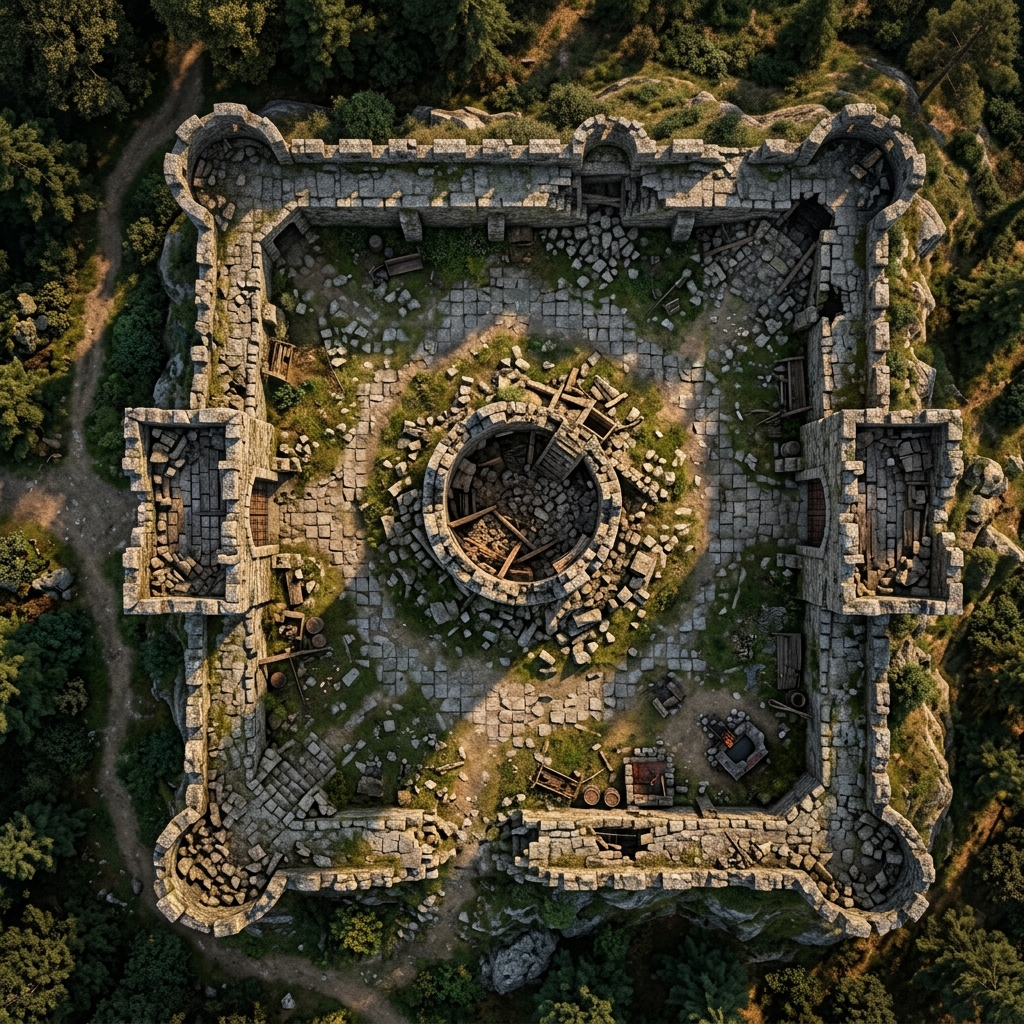
Every Game Master knows the crushing feeling of watching an encounter turn into a boring slugfest. You spend hours planning, only for the fight to take place in a featureless stone room. Without interesting terrain, tactical choices evaporate. Your players simply stand still, roll dice, and trade hit points. If you want combat to feel dynamic, you need environments that actively shape the flow of battle. Using a specialized ai battle map generator can change your entire preparation workflow, turning simple text prompts into playable tactical maps instantly.
What Is an AI Battlemap Generator?
An ai battlemap generator translates text prompts into fully realized visual environments for tabletop RPG combat. Traditional mapping software requires manually placing every asset: clicking and dragging tiles, lining up tree sprites, and painting ground textures. This tedious process easily swallows hours of weekly prep time.
In contrast, a dedicated battle map generator ai handles the rendering work in seconds. Instead of searching through asset packs, you simply describe the scene. The system builds cohesive textures, places obstacles, and sets realistic lighting. With tools like the Text to Tabletop app, you can instantly generate playable scenes directly from campaign notes, allowing you to focus on the story.
The Five Pillars of a Tactical Battle Map
To get the most out of your map generation, you must understand what makes a layout functional for tactical gameplay. A beautiful image is nice, but a playable map requires structural elements that force players to make meaningful decisions. When using an ai battlemap generator, include at least two or three of these five pillars in your prompts.
First is cover. Cover is the counter to ranged dominance. It forces mobile characters to hunt for clean lines of sight while keeping fragile spellcasters safe. When prompting, specify substantial objects that block sight and projectiles, like "granite boulders, thick oak crates, and partially collapsed stone walls."
Second is elevation. Vertical layers instantly create high-value terrain that both sides will fight to control. Mechanically, holding the high ground should grant line-of-sight advantages or safety. Bake this in by prompting for "a raised wooden platform accessible by a ladder, or steep rocky ledges."
Third is hazards. Dangerous terrain forces players to constantly re-evaluate positioning. Introduce tension by prompting for elements like "pools of caustic acid, jagged glowing crystals, or slick ice." Clever players can shove or slide enemies into these areas.
Fourth is choke points. Natural bottlenecks prevent combatants from immediately clumping into one giant melee pile. They allow defensive characters to hold back overwhelming numbers. Include bottleneck phrases in your prompts like "a narrow stone archway, a rickety rope bridge over a fissure, or a tight canyon pass."
Fifth is focal interaction objects. Every memorable combat encounter needs a centerpiece: a specific object that can radically alter the state of battle when used. Prompt for items like "a massive central crystal pulsing with energy, a heavy iron lever, or an open sacrificial altar."
Generating Your First Tactical Battle Map with an AI Battle Map Generator
Let us walk through a complete example of how to build a prompt for a tactical encounter. Imagine your party is hunting a band of raiders back to their wilderness stronghold. You want to create a high-stakes ruined watchtower siege.
Instead of prompting "a ruined tower in the woods," explicitly weave tactical pillars into your text. A highly effective prompt looks like this:
A top-down tactical battle map of a ruined stone watchtower situated on a rocky cliff edge. The tower is partially collapsed, creating patches of stone rubble that serve as half cover. A narrow, winding dirt path serves as a choke point leading up the cliffside. On one side of the map, a tiered wooden scaffolding creates three distinct levels of elevated platforms. In the center of the ruins, a large iron ballista sits on a rotating wooden mount as a focal interaction object. Surrounded by dense autumnal pine trees.
When you feed this into our specialized AI battle map generator, you get a file that is immediately playable. The generator translates your text into a crisp, high-resolution layout. You will see clear tactical pathing created by the cliffside trail, defensive utility in the scattered masonry, and vertical scaffolding. Your players will instantly recognize their options: they can brave the narrow path, use the rubble for cover, or rush the scaffolding to control the ballista.
Why Specialized Tools Beat Generic AI
Many Game Masters initially try to generate session assets using generic, all-purpose AI art models like Midjourney or Stable Diffusion. While these platforms produce stunning conceptual art, they consistently fall short when tasked with creating functional, usable grid-based combat maps. Generic image models are built to create artistic compositions, not tactical game design tools.
The biggest issue is perspective distortion. Standard generators prefer dramatic angles and cinematic lighting, which results in a skewed isometric viewpoint. Running a combat encounter on a map where the north wall is angled at 45 degrees and floor tiles warp toward a distant horizon is frustrating: it completely ruins range calculations.
This is why choosing a dedicated ai battlemap generator over a generic art engine is essential. Our specialized AI battle map generator solves this perspective issue by implementing a strict, automatic 90-degree top-down camera lock. Every pixel is generated from a perfectly perpendicular overhead perspective, keeping lines straight and proportions accurate.
Furthermore, generic models love to draw grids directly into the artwork or populate the scene with permanent characters. This is incredibly frustrating because the baked-in grid never aligns with virtual tabletop software, and a static monster graphic cannot be moved. Text to Tabletop fixes this by utilizing grid and NPC stripping. The system generates clean, unblemished environments, allowing you to easily overlay your own grids and place your own dynamic tokens.
Five AI Battle Map Prompts to Try Today
If you need to quickly populate your campaign folder, you can copy, paste, and modify these five proven prompts. They work perfectly with Text to Tabletop, delivering clean layouts with clear tactical features.
- Crumbling stone bridge over a chasm:
Top-down tactical battle map of a massive stone bridge spanning a foggy mountain chasm. The center is broken, creating a dangerous gap. Scattered debris and broken statues provide half cover along the walkway.
- Frozen waterfall cavern:
Top-down tactical battle map of an underground ice cavern. A massive frozen waterfall dominates the northern wall, creating slippery, elevated ice ledges. Crystalline stalagmites are scattered across the room to break line of sight.
- Burning library:
Top-down tactical battle map of a grand library caught in a fire. Rows of wooden bookshelves create a maze of tight choke points. Several fallen shelves are engulfed in flames, creating hazards.
- Underwater shrine:
Top-down tactical battle map of a submerged stone temple. Overgrown coral reefs act as difficult terrain, deep oceanic trenches flanking the central altar act as hazards, and sunken pillars provide cover.
- Floating sky dock:
Top-down tactical battle map of a wooden airship docking platform floating above clouds. Mooring chains act as obstacles, and the edges have no railings, creating a constant drop hazard.
For more creative inspiration, check out our guide on 10 unique AI battle map ideas to expand your library.
Beyond the Map: Running the Encounter
Once your map is generated and uploaded, the environment should actively participate in the fight. Do not let the terrain sit there as a static background. Have your enemies use cover intelligently: monsters should hide behind rocks, and defenders should block choke points.
Encourage players to interact with the map by describing features with vivid sensory details. Remind them of the crumbling cliff edge or the humming central crystal. When the environment feels real, reactive, and physically present, players will naturally start using it, turning a standard fight into a memorable cinematic set piece.
Ready to stop spending your valuable prep time wrestling with tedious asset placement? Head over to our AI battle map generator landing page to see what is possible, or jump straight into the Text to Tabletop app to start creating your own custom tactical combat environments today.
Tyler V
Lead Developer and UX Designer at Text to Tabletop. Passionate about helping GMs and players create better TTRPG experiences.
Ready to Forge Your Next Battle Map?
Describe the encounter and get a grid-aligned, top-down battle map in seconds, then regenerate any area until it matches your vision.
Generate Your First Map Free3 free map tokens · no credit card required